Support Forum
Problem using layers::technologyLayerSetParameter(int layer,int parnum,int value)
Ted
Friday 10th December 2021
Attachments:
(only for registered users)
layer_manager.png
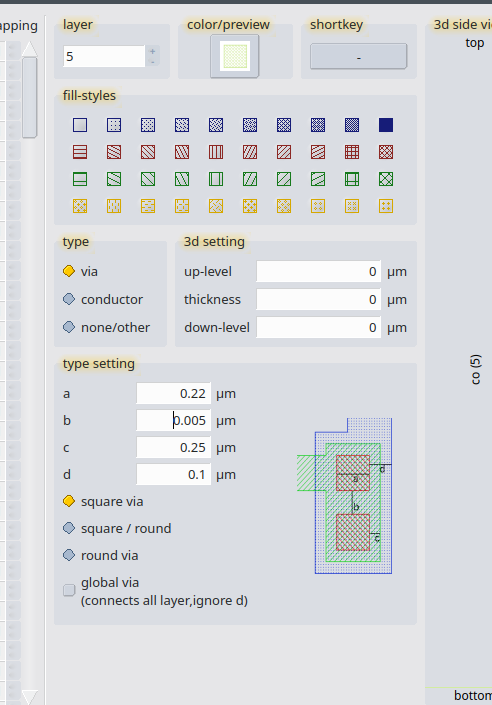
So first off, there are duplicate descriptions for ‘paramnum’ in the manual (https://layouteditor.org/layoutscript/api/layers#20): ``` 3 via layer: distance via edge - conductor at top layer 4 via layer: distance via edge - conductor at top layer ``` I’ve been assuming that 3 is for bottom layer. My bigger issue is that when I try to set these values in a script: ``` layers::technologyLayerAdd(5,1); layers::technologyLayerSetParameter(5,0,1); layers::technologyLayerSetParameter(5,1,min_width_co); // int min_width_co = 220; layers::technologyLayerSetParameter(5,2,spacing_co_to_co); // int spacing_co_to_co = 250; layers::technologyLayerSetParameter(5,3,extension_p1_past_co); // int extension_p1_past_co = 100; layers::technologyLayerSetParameter(5,4,extension_m1_past_co); // int extension_m1_past_co = 5; layers::technologyLayerSetParameter(5,5,0); ``` in layer manager it looks like the via width is being used where one of the extensions should be, and vice versa, as in the picture.
Friday 10th December 2021
Attachments:
(only for registered users)
layer_manager.png
So first off, there are duplicate descriptions for ‘paramnum’ in the manual (https://layouteditor.org/layoutscript/api/layers#20): ``` 3 via layer: distance via edge - conductor at top layer 4 via layer: distance via edge - conductor at top layer ``` I’ve been assuming that 3 is for bottom layer. My bigger issue is that when I try to set these values in a script: ``` layers::technologyLayerAdd(5,1); layers::technologyLayerSetParameter(5,0,1); layers::technologyLayerSetParameter(5,1,min_width_co); // int min_width_co = 220; layers::technologyLayerSetParameter(5,2,spacing_co_to_co); // int spacing_co_to_co = 250; layers::technologyLayerSetParameter(5,3,extension_p1_past_co); // int extension_p1_past_co = 100; layers::technologyLayerSetParameter(5,4,extension_m1_past_co); // int extension_m1_past_co = 5; layers::technologyLayerSetParameter(5,5,0); ``` in layer manager it looks like the via width is being used where one of the extensions should be, and vice versa, as in the picture.
Jürgen
LayoutEditorFull
Friday 10th December 2021 Sorry Ted, the manual was incorrect. I have just fix it. The correct assignment is: ``` 1 is via width 2 distance via edge - conductor at top layer 3 distance via edge - conductor at bottom layer 4 spacing between two vias 5 via shape ```
LayoutEditorFull
Friday 10th December 2021 Sorry Ted, the manual was incorrect. I have just fix it. The correct assignment is: ``` 1 is via width 2 distance via edge - conductor at top layer 3 distance via edge - conductor at bottom layer 4 spacing between two vias 5 via shape ```
Ted
Saturday 11th December 2021 Thanks!
Saturday 11th December 2021 Thanks!
Support forums are fading

Support forums are fading because nobody wants to wait days for a reply. AI answers faster and better. LayoutEditor is no different: please use Help → AI Console in the LayoutEditor for all questions. If that is not enough, licensed users still have e-mail support at support@layouteditor.com. This forum remains available here as an archive.