Support Forum
Recover unsaved work
Ron
Monday 1st July 2019 My layout editor crushed and a lot of work is lost. Is there a way to recover it? also is there a way to define auto save to prevent this from happening again?
Monday 1st July 2019 My layout editor crushed and a lot of work is lost. Is there a way to recover it? also is there a way to define auto save to prevent this from happening again?
Jürgen
LayoutEditorFull
Monday 1st July 2019 An autosave can be activated in the setup dialog under misc/auto_save. A copy every set minutes will be created in the temporary folder. If you have not already turned it on, there is no way to restore it. In any case the LayoutEditor should not crash. If you are able to reproduce this problem, please send us an example showing it, the problem will be fixed with the next update
LayoutEditorFull
Monday 1st July 2019 An autosave can be activated in the setup dialog under misc/auto_save. A copy every set minutes will be created in the temporary folder. If you have not already turned it on, there is no way to restore it. In any case the LayoutEditor should not crash. If you are able to reproduce this problem, please send us an example showing it, the problem will be fixed with the next update
JstDill
Thursday 27th November 2025
Attachments:
(only for registered users)
 28.lec
I wanted to change the design on an older file. I started working on the new design and saved every time I finished the session. After a few days, when I was done, I saved it on the desktop. Then, when I reopened it, all the new progress was gone and the original design reappeared. How is this even possible? I deleted the old one and drew new structures over the course of days and several saves. Is there a way to restore it?
Thursday 27th November 2025
Attachments:
(only for registered users)
28.lecI wanted to change the design on an older file. I started working on the new design and saved every time I finished the session. After a few days, when I was done, I saved it on the desktop. Then, when I reopened it, all the new progress was gone and the original design reappeared. How is this even possible? I deleted the old one and drew new structures over the course of days and several saves. Is there a way to restore it?
Jürgen
LayoutEditorFull
Thursday 27th November 2025 I guess you have saved your changes in a different format. For example your design was a mydesign.gds and if you change the format you may get a mydesign.oas with all the changes and the original design is still in mydesign.gds. There is an autosave option in the setup. If it is turned on your design will be stored every few minutes in your work in that stage can be recovered. If it is turned off and not store in any other way the work is lost.
LayoutEditorFull
Thursday 27th November 2025 I guess you have saved your changes in a different format. For example your design was a mydesign.gds and if you change the format you may get a mydesign.oas with all the changes and the original design is still in mydesign.gds. There is an autosave option in the setup. If it is turned on your design will be stored every few minutes in your work in that stage can be recovered. If it is turned off and not store in any other way the work is lost.
Support forums are fading
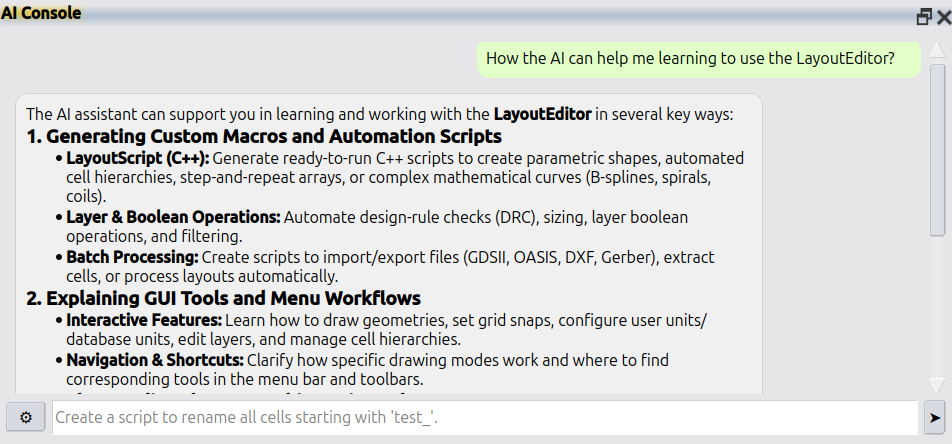
Support forums are fading because nobody wants to wait days for a reply. AI answers faster and better. LayoutEditor is no different: please use Help → AI Console in the LayoutEditor for all questions. If that is not enough, licensed users still have e-mail support at support@layouteditor.com. This forum remains available here as an archive.