Support Forum
adjusting text size/line height
User
LayoutEditorFull
Wednesday 7th November 2018
Attachments:
(only for registered users)

large_text_size.png
I somehow adjusted the default text size/line height in the text editor, and unfortunately I don’t remember what I did (I’ve been searching for some time). I’m thinking about wiping & reinstalling with defaults unless you can suggest an easier way to try to fix this issue. 
LayoutEditorFull
Wednesday 7th November 2018
Attachments:
(only for registered users)
large_text_size.png
I somehow adjusted the default text size/line height in the text editor, and unfortunately I don’t remember what I did (I’ve been searching for some time). I’m thinking about wiping & reinstalling with defaults unless you can suggest an easier way to try to fix this issue. 
Jürgen
LayoutEditorFull
Wednesday 7th November 2018 The line height/text size in the integrated TextEditor can be adjusted with a Control key + mouse wheel. The settings is restored after restart of the LayoutEditor and will also effect the icon size. To get the defaults start the LayoutEditor with the *--reset* option from the command line. For windows system a *reset.bat* script is suppliered in the LayoutEditor folder doing the same.
LayoutEditorFull
Wednesday 7th November 2018 The line height/text size in the integrated TextEditor can be adjusted with a Control key + mouse wheel. The settings is restored after restart of the LayoutEditor and will also effect the icon size. To get the defaults start the LayoutEditor with the *--reset* option from the command line. For windows system a *reset.bat* script is suppliered in the LayoutEditor folder doing the same.
Support forums are fading
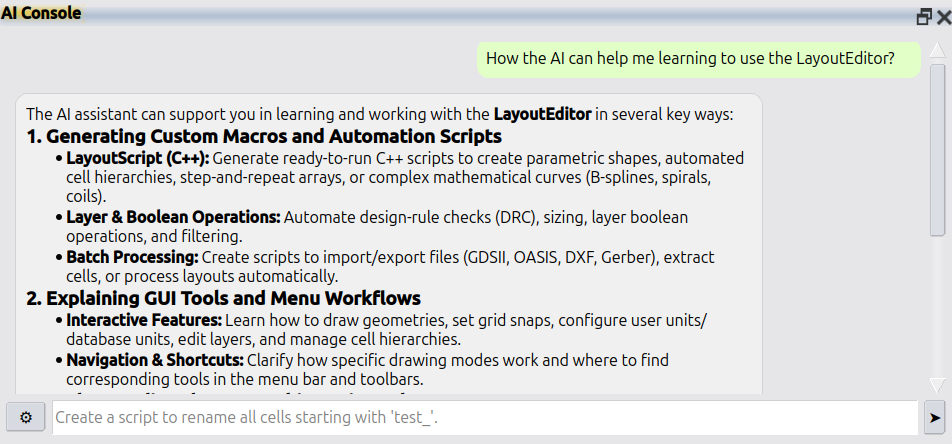
Support forums are fading because nobody wants to wait days for a reply. AI answers faster and better. LayoutEditor is no different: please use Help → AI Console in the LayoutEditor for all questions. If that is not enough, licensed users still have e-mail support at support@layouteditor.com. This forum remains available here as an archive.